
Choose an office chair by fit first: the seat height must let your feet sit flat with your forearms level with the desk, the backrest should meet the curve of your lower back, and the armrests should clear the desk edge. Then match the material to your hours, and the chair's size to your room.
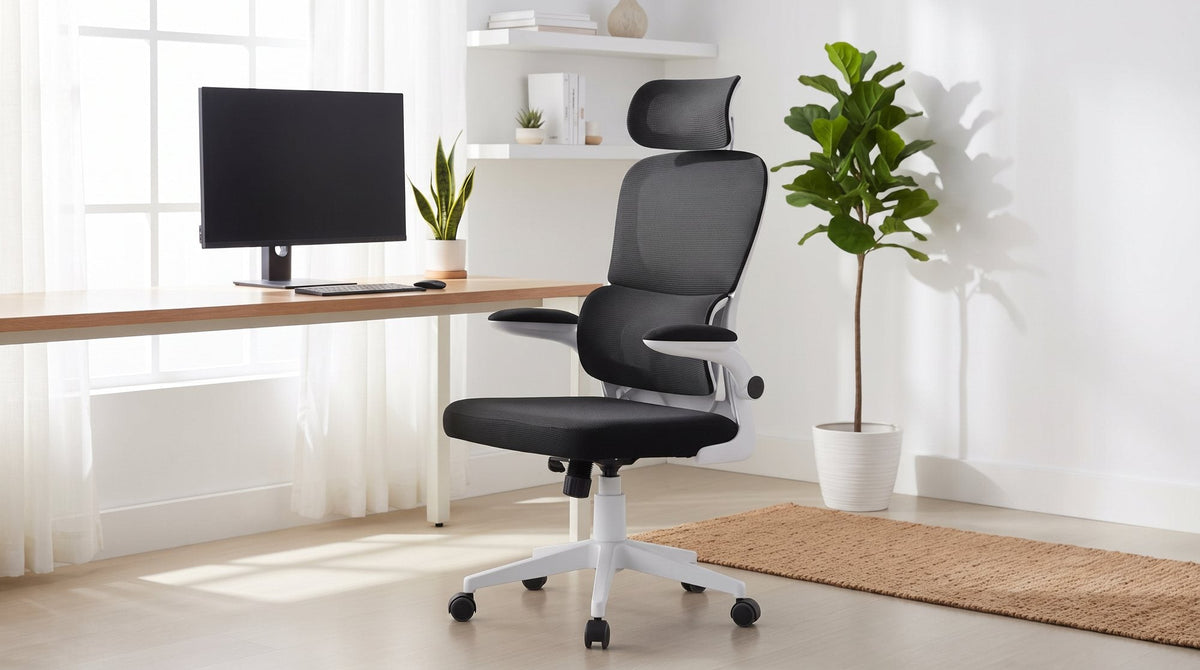
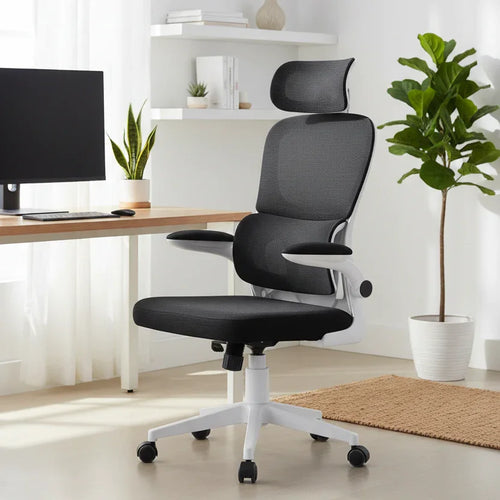
- If you sit for long, warm days: pick a mesh chair with a headrest, like the Cloud.
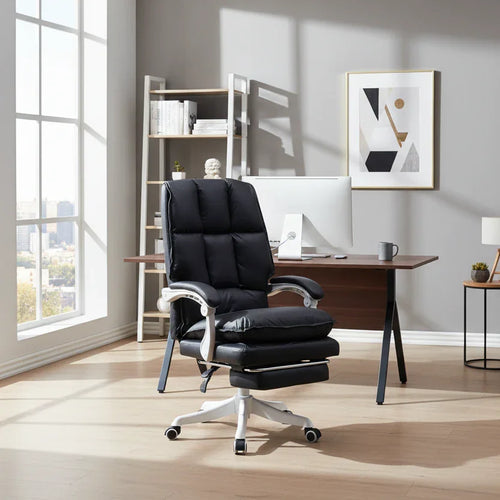
- If you want a padded executive feel: pick the Copenhagen, with its pull-out footrest.
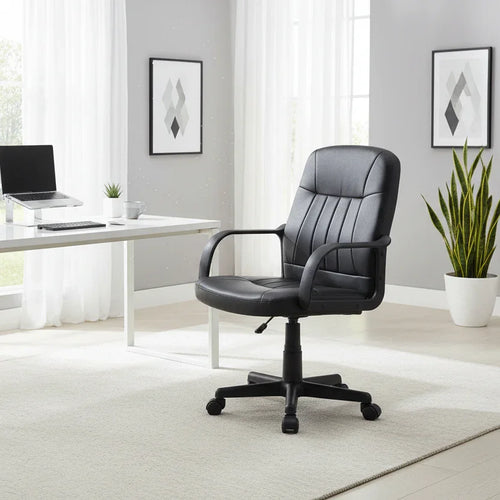
- If your desk is in a tight corner: pick a compact mid-back chair, like the Clontarf.
In this guide
Start with how long you sit
The single most useful question to answer before you look at any chair is how many hours a day you'll actually sit in it. It changes what's worth paying attention to.
- An hour or two. Checking emails, paying bills, homework. A comfortable seat at the right height covers most of it. Fancy mechanisms won't change much.
- Half a working day. Hybrid work or study. Now a reclining backrest and armrests that suit your desk start to matter, because you'll shift position more.
- A full working day. Full-time work from home. Every adjustment gets used, and so does the upholstery: on a warm afternoon, a breathable mesh back is noticeably cooler than solid padding.
Whatever chair you choose, no chair replaces getting up and moving. Stand for phone calls, take lunch away from the desk, and change position through the day. A chair that lets you shift comfortably is more useful than one that holds you in a single "perfect" posture.
Pieces in this guide

The adjustments that matter, in order
Check these in this order. If a chair fails the first one, the rest don't matter.
1. Seat height
Set the seat so your feet sit flat on the floor and your forearms rest roughly level with the desk. Every chair in the table below has a gas-lift lever for this. Check the height range against your own desk when you sit-test, especially if your desk is higher or lower than usual.
2. Lower-back support
Sit all the way back. The backrest should meet the curve of your lower back without pushing you forward or leaving a gap. Some chairs have a shaped lumbar curve built into the back; others rely on cushioning. Adjustable lumbar support is a feature to look for if you're very tall or very short, and it isn't listed on any of the chairs below, so sit-testing the fixed shape is the way to check fit.
3. Armrests
Armrests should let your shoulders relax and should not stop you pulling in close to the desk. Flip-up armrests fold against the backrest so the chair slides fully under the desk. Fixed armrests are fine if they clear your desk edge, so measure the height of your desk's underside before you buy.
4. Recline and tilt tension
A reclining backrest lets you switch between an upright working position and a relaxed lean-back. Tilt tension sets how much the backrest resists you. Too loose and it tips back suddenly; too firm and it barely moves.
5. Base and castors
A five-star base is the standard for stability, and castors let you roll back and swivel without standing. Check how they roll on your floor type, especially if you have rugs.
A headrest is a sixth option. It earns its keep if you lean back for calls or reading; for head-down typing, many people barely touch it.
How our chairs compare on adjustments
Our office chair range is small and deliberately so. Here is what each chair offers, taken from its product details. Where a feature isn't listed, we haven't claimed it.
| Chair | Back | Recline | Armrests | Extras |
|---|---|---|---|---|
| Cloud Ergonomic Mesh | High-back mesh, built-in lumbar curve | Yes, adjustable tension | Flip-up | Headrest that tilts and pivots |
| Casino Ergonomic Mesh | High-back mesh | Yes | Flip-up | Headrest that slides up and down |
| Copenhagen Executive | High-back, quilted channel padding | Yes, tilt lever | Padded | Retractable footrest |
| Camp PU Leather | High-back, three cushioned panels | Yes, adjustable tension | Padded PU on chrome | Chrome frame and base |
| Camp Fabric | High-back, three cushioned panels | Yes, adjustable tension | Chrome with leather-look pads | Grey technology fabric |
| Clontarf Fabric | Compact mid-back, channel-stitched padding | No | Fixed loop | Simple, low-fuss design |
All six have gas-lift seat height and a five-star castor base. None lists an adjustable seat depth, so if you're notably tall or short, sit-test before you buy.

For long days, the two mesh chairs carry the most adjustment. The Cloud Ergonomic Mesh Office Chair pairs mesh on the back and seat with a built-in lumbar curve and adjustable tilt tension, and comes in Black or Grey with a white frame. The Casino Ergonomic Mesh Office Chair has a headrest that slides up and down its track, so it's worth trying if headrest height is your sticking point. It comes in Grey with a white frame or Black with a black frame.
If you prefer padding, the Copenhagen Executive Office Chair has quilted channel padding on the back and seat and a footrest that pulls out from under the seat for breaks. The Camp Fabric Office Chair and Camp PU Leather Office Chair share one frame and mechanism in two coverings; our PU leather vs fabric comparison walks through that choice.
Choosing a chair for a small home office
In a spare-room corner, a hallway nook or a desk in the bedroom, the chair has to work when you're sitting in it and get out of the way when you're not. Four checks matter more than the chair's headline width.
- Tuck-under. Can the chair slide fully under the desk? Flip-up armrests, like those on the Cloud and Casino, solve this when fixed arms would catch the desk edge.
- Roll-back room. The base sticks out further than the seat. Leave enough clear floor behind you to roll back and stand up without hitting a wardrobe, bed or door.
- Door swing. If the chair sits in a door's path when it's not tucked in, you'll be moving it every day.
- Visual weight. A high, heavily padded back can dominate a small room even when it physically fits. An open mesh back or a compact mid-back looks lighter.

The Clontarf Fabric Office Chair is the compact option in our range: a mid-back chair in black technology fabric with channel-stitched padding, fixed loop armrests and a gas-lift base on castors. Its smaller footprint helps it blend into a room rather than dominate it, and it suits a study desk for a student or a second chair for a small business.
Pair the chair with the desk at the same time. Our home office furniture range includes straight study desks rather than corner desks, so measure the wall you have and check that the chair's arms clear the desk's underside.
A five-minute sit test
Most chairs feel fine for thirty seconds. This routine picks up the problems you'd otherwise find a few weeks in.
- Sit without adjusting anything. If it feels wrong straight away, adjustment rarely fixes it. Move on.
- Set the seat height. Feet flat, forearms roughly level with a desk. If you can't get there, it isn't your chair.
- Sit right back. Feel where the backrest meets your lower back. You want contact, not a gap and not a push forward.
- Lean back. The recline should feel controlled. Adjust the tension if the chair has it.
- Push it under a desk. Check the arms clear and the base rolls cleanly. Then shift around for the rest of the five minutes.
Bring your desk height and the size of your space with you. We have five showrooms, at Rocklea, Virginia, North Ipswich, Bundall and Beenleigh; ask which store has the chair you like on display before you visit.
Office chair questions
Is a proper office chair worth it?
If you sit at a desk for more than an hour or two most days, yes. A chair with adjustable seat height, a supportive backrest and a recline lets you set up properly and change position through the day, which a dining or kitchen chair can't do.
What size desk chair do I need?
One that lets your feet sit flat with your forearms level with the desk, and that slides under your desk when you're not using it. In a small room, also check the base has room to roll back. A compact mid-back chair like the Clontarf suits tighter spaces.
What are the main types of office chair?
Most home office chairs fall into mesh task chairs, padded executive chairs and compact task chairs. Mesh chairs like the Cloud and Casino let air through; executive chairs like the Copenhagen are padded and high-backed; compact chairs like the Clontarf suit small spaces and shorter sessions.
Do I need a headrest on an office chair?
Only if you lean back regularly, for calls, reading or breaks. For head-down typing, many people rarely use one. If you do want one, the Cloud's headrest tilts and pivots, and the Casino's slides up and down.
Which office chairs suit a small flat?
Look for a chair that tucks fully under the desk and looks light in the room. Flip-up armrests, like those on the Cloud and Casino, help the chair slide under the desk, and the compact mid-back Clontarf takes up less visual space.
Can I try a chair before I buy it?
Yes. We have five showrooms: Rocklea, Virginia, North Ipswich, Bundall and Beenleigh. Ask which store has the chair you're interested in on display, and bring your desk height with you.